Product Description
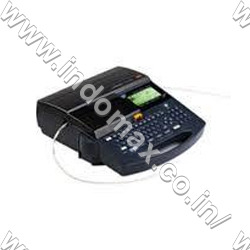
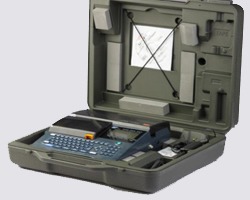
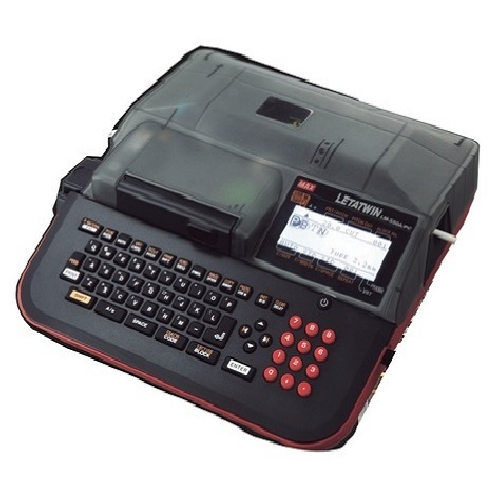
Indo max offers an Ferrule Printing Machine for Making Adhesive Label, Max LM 390A, the latest portable type with compact design with many applications and ease of operation. This can be used in preparation of self-adhesive labels and ferrules used for control panels. Alphabetical/Numerical characters can be printed on both the tubes (sleeves) and self adhesive tapes with desired adjustment in character size, space and width. This machine has a nice LCD backlit display for viewing the matter to be printed and also has a very important advantage of accepting data directly from PC, which will save the operational time and labour cost. One can directly connect the machine to the PC and after giving the print command, print ferrules from the PC directly. One can also use the USB external memory stick for transferring the data from PC to LM machine. The machine has in-built memory capacity of 1, 00,000 characters with 5,000 characters in 20 files each. Initially people were using cut single ferrules for wiring application. The disadvantages of using such ferrules are:
- The time required to insert a single ferrules is more
- The printing on cut ferrules fades after few months
- Cut ferrules fall down from the wire and cannot be readable
- Wrong serial ferruling may happen in cut ferrules and it is usually non uniform as space depends on the character prints as supplied
- Even the ferrule rotation disrupts the line up, and separate insulation is an added cost in this case
- Faulty combination due to human error
- Maintaining an inventory, adding to the cost
Technical specification
Dimensions | 275 x 300 x 91 mm |
Weight | 2,3 kg |
Printing method | Thermal transfer method(300dpi) |
Display | LCD dot matrix : 64 x 160Pixel (Backlit) |
Printing speed | 35mm/s(Standard) 20mm/s(Low temperature mode) |
Character size | 2, 3, 4 or 6 mm |
Usable tube size | 2,5 ~ 6,5 mm ((PVC, Shrinkable tube) |
Usable tape size | Width 5,9,12mm (MAX genuine tape) |
Internal memory | 100.000 characters per file (max. 5000 per folder; max. amount of folders: 50) |
External memory | USB memory |
Interface | USB 2.0 full speed |
Power supply | DC 12V, 3.3A [Use only specified AC adapter(100V-240V) included in the package. ] |
Power consumption | max. 16W |
Operating environment | 10 to 35 degrees celcius |
Versatile Printing OptionsWith its support for both dot matrix impact and thermal transfer methods, this ferrule printing machine accommodates a variety of labeling materials, including adhesive labels, ferrules, and heat shrink tubes. Multiple font styles and sizes ensure clear and customized results tailored to your project needs.
User-Friendly Interface and ControlEquipped with a microcontroller-based LCD display, the machine offers intuitive operation, making setup and monitoring hassle-free. The automatic cutting function and comprehensive safety featuressuch as overheat protection and error alarmshelp streamline workflow and minimize risks during use.
Compact Yet Powerful DesignDespite its compact desktop size, this versatile printer delivers high-speed performance (25 mm/sec) and a printing width of up to 9 mm. Its lightweight build, under 3.5 kg, ensures portability, while compatibility with Windows systems and multiple connection interfaces provide seamless integration in industrial environments.
FAQs of Ferrule Printing Machine For Making Adhesive Label:
Q: How does the Ferrule Printing Machine operate for different label types?
A: The machine supports both dot matrix impact and thermal transfer printing, allowing it to print on adhesive labels, ferrules, and heat shrink tubes. You simply load the desired material, select your print settings on the backlit LCD display, and let the automatic cutter complete the job efficiently.
Q: What applications is this machine suitable for?
A: This ferrule printing machine is ideal for wire marking, cable tagging, and various industrial labeling tasks. Its compatibility with specialized materials ensures it meets the demands of electrical, manufacturing, and export/import labeling in industrial settings.
Q: When should I use the automatic cutter function?
A: The automatic cutter is used after printing to ensure smooth, precise label separation. It is particularly beneficial when handling long batches or continuous label rolls, as it enhances efficiency and reduces manual labor.
Q: Where can this machine be integrated within my workflow?
A: Due to its compact size and multiple connectivity options (USB 2.0, RS232), it easily fits on any desktop in office or industrial environments. The device also supports integration with Windows 7, 8, or 10 PCs for seamless data management and label design.
Q: What is the process for starting a print job?
A: To begin, connect the machine to your computer using USB or RS232, install the included software from the CD, and load your material (label, ferrule, or tube). Design your label using the software, set your preferences, and initiate the print through the LCD interface. The machine will print and cut labels automatically.
Q: How does the machine ensure safe operation during prolonged use?
A: Safety is prioritized with built-in overheat protection to prevent thermal damage, alongside an error alarm system that alerts you to operational issues, ensuring reliable and continuous operation.
Q: What are the key benefits of using this ferrule printing machine?
A: Key benefits include high-speed, high-quality monochrome prints, automatic operation with minimal intervention, support for various label formats, and robust safety featuresall packed in a compact design suitable for busy industrial environments.










 Send Inquiry


